
Load lifecyle
Follow a load from creation to proof of delivery, by posting it or booking direct.
Most integrations follow a similar journey from creating a load to proving delivery. There are two routes at the start: posting a load to receive quotes from carriers, or booking directly. Follow the journey end to end in the test environment to test your integration.
See the API Reference material for the full list of endpoints.
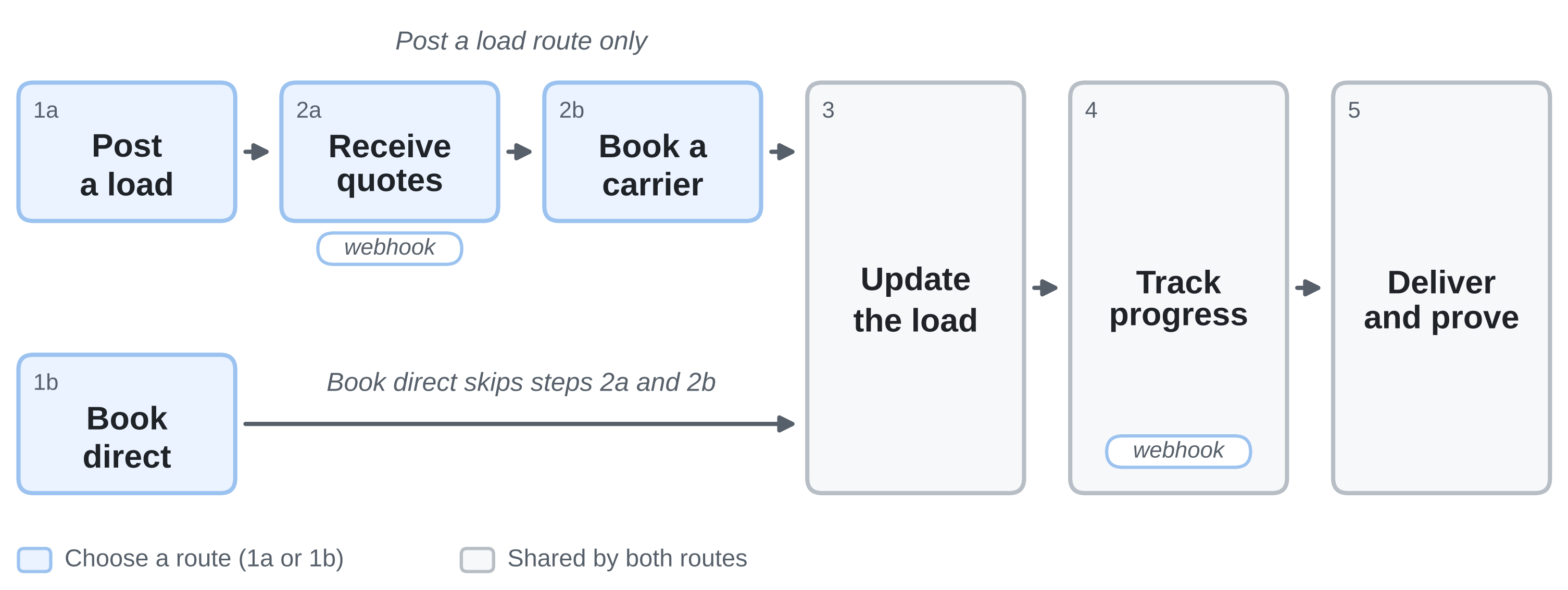
1a) Post a load
Creates an unallocated load (status Posted), open for quotes. Set callbackRequired to true if you want LOAD and STOPS webhooks.
1b) Book direct
Creates the load as a booking in one call. It uses the same endpoint as 1a, but you include the booking details. The booking must be allocated to your own company. Skip 2a and 2b.
2a) Receive quotes (post a load only)
Carriers quote on your load. We recommend receiving quotes by webhook.
Receive quotes using the quote posted webhook
2b) Book a carrier (post a load only)
Choose a carrier and allocate the load to them. The load becomes Booked. If you don't know the carrier's company ID, look it up first with Get company brief.
Return a company's subcontractors
3) Update the load
Make further changes once the load is booked. Posted loads can't be updated.
Add or change information once a load has been allocated
4) Track progress
Booking status changes, for example en route to pickup, loaded, arrived at delivery and delivered, and driver's estimated time of arrival are sent to you by webhook.
Receive load booking status updates
Receive updates on the driver's ETA
5) Deliver and prove
Create proof of delivery, which completes the load, and upload any documents. Document uploads use multipart/form-data.
Create proof of delivery as a load owner or executor
Upload documents for your company's loads
Note: In Production, use the Production base URL (see Environments). Use each path exactly as shown. Some load endpoints use /load/ and others use /loads/.
Next: Go live checklist
Updated about 4 hours ago